
Screen resolution and safe area
It is important that as an application developer, you understands the different screen resolutions of the television devices that your applications may run on and how HbbTV works with them.
Screen resolution
Screen resolution refers to the number of distinct pixels that can be displayed on a television screen, usually described in terms of the number of pixels on the horizontal and vertical axes.
Common resolutions are:
- SD (Standard Definition): 720×480 (NTSC) or 720×576 (PAL)
- HD (High Definition): 1280×720 (720p)
- Full HD: 1920×1080 (1080p)
- Quad HD (2K): 2560×1440 (1440p)
- Ultra HD (4K): 3840×2160 (2160p)
- 8K: 7680×4320
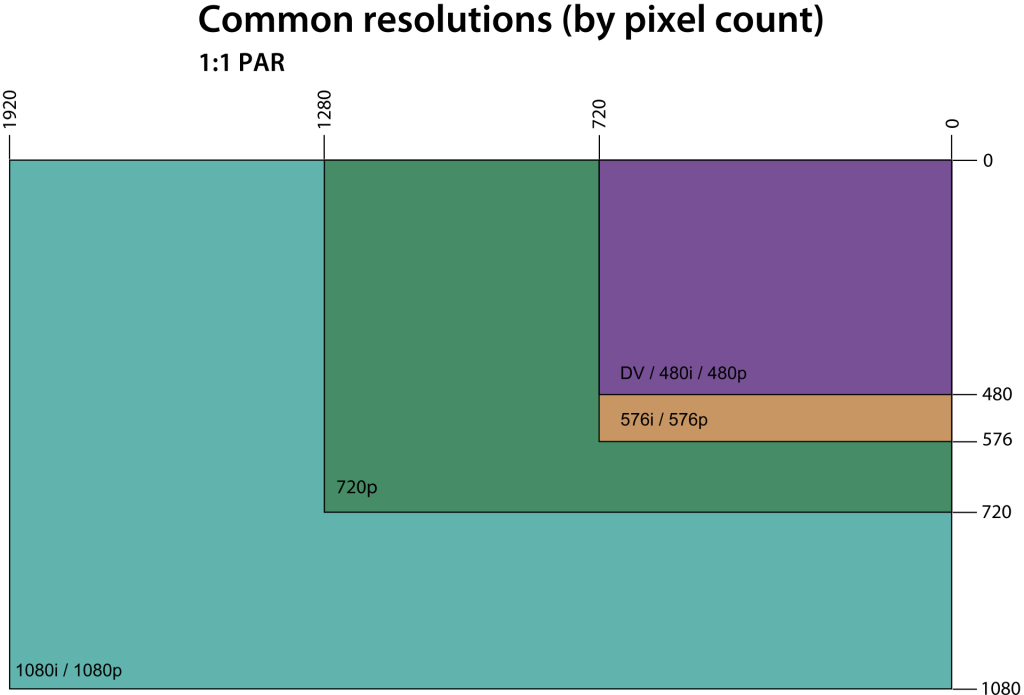
Common screen resolutions
The resolution of the content a device is showing does not need to be the same as its native screen resolution. A television device is capable of display content that is a lower resolution scaled up to it native resolution. A television device may be able to display content that is a higher resolution which is scaled down. In the early days of high-definition television, televisions were often described as “HD ready” with a capability to received 1080p content but only had a screen resolution of 720p.
Aspect ratio
Aspect ratio is related to screen resolution and is the ratio of the width to the height of the screen. Common aspect ratios include 4:3 (traditional TVs) and 16:9 the standard ratio of modern TVs.
Aspect ratio is not automatically calculated from the screen resolution as pixels are not necessarily square. PAL resolution is not a 4:3 ratio and pixels are stretched to fit. HD resolutions have square pixels and so the screen resolution ratio and aspect ratio do match.
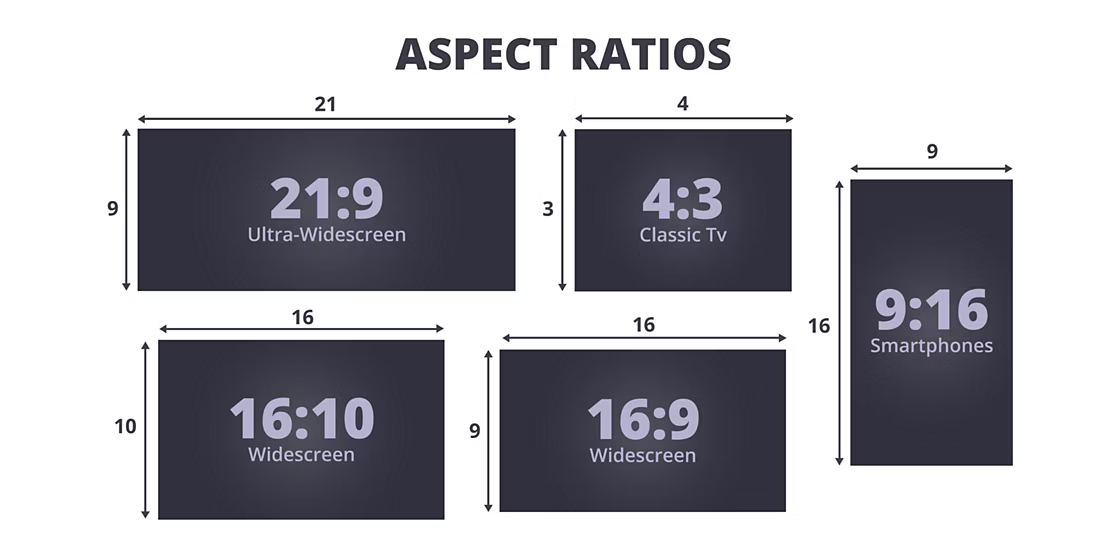
Historically, 4:3 was the aspect ratio of film. When television emerged, film moved to 16:9 and wider, to create a greater difference in the cinematic experience. 16:9 aspect ratio is close to the golden ration, a ratio that often occurs in nature and art.
HbbTV supported resolutions
In order to maintain backwards compatibility and reduce the memory required by applications, HbbTV supports a standard graphics resolution of 1280×720.
However, the supported graphics resolutions by HbbTV have changed from version to version. Details of supported resolution are given in section 10.2 of the HbbTV specification.
The table below gives the high level details of what resolutions each versions supports:
| Version | Support Resolution | Notes |
|---|---|---|
| 1.0, 1.5 | 1280×720 | |
| 2.0.1, 2.0.2, 2.0.3 | 1280×720 with a 16:9 aspect ratio. | An API was specified that enable applications to exploit a higher available resolution for images and text. |
| 2.0.4 | A minimum of 1280×720 with a 16:9 aspect ratio. | Signalling was specified that enable applications to define the graphic coordination system they use. |
HbbTV screen resolution support by version.
From version 2.0.1 there is a separation of the concept of the application graphics coordination system and the application graphics plane resolution. Though this terminology is only used in 2.0.4.
“The terminal shall have a graphics plane resolution that is at least equal to the resolution of the co-ordinate system seen by the application. The graphics plane may have a higher resolution than this. This allows for higher resolution rendering of application text and images. The granularity with which an application can position graphics is determined solely by the co-ordinate system resolution.”
From 2.0.1 this enabled application to provide and correctly render higher resolution images using the native resolution of the television while still working with a coordination system that is 1280×720.
From 2.0.4 a graphics coordination resolution greater then 1280×720 has been supported, to use a higher resolution application must signal their use of this in the graphics constraints descriptor in the application signalling (AIT or XML AIT).
With 2.0.4, an application can be made responsive, changing resolution based on the underlying television device or be produced in multiple versions with different resolutions.
A HbbTV developer needs to consider multiple resolutions:
- The native screen resolution of the television device the application is running on
- The graphics resolution they are developing the application to support
- The content resolution of any video the applications is being shown with where the video content and graphic content need to align
Safe area
Safe area refers to portions of the screen that can be reliably viewed on all television displays without being cut off, distorted or obscured. This concept was traditionally important in television production and broadcasting to ensure that critical content is visible to the viewer, regardless of the TV’s overscan settings or aspect ratio.
The need for a safe area was due to what was known as overscan. Some televisions display less than the full image, cropping the edges. There could also be distortion towards the edges of a screen making graphics difficult to read in these areas This was particularly true of cathode ray tube (CRT) based televisions. But to reduce cost early digital displays would not be the full resolution to purported to support.
There can also be issues with content of varying aspect ratios (4:3, 16:9, 22:9) may be scaled on televisions of a different aspect ratio.
With the advent of digital displays and high-definition broadcasting, the need for strict adherence to safe areas has decreased, as modern TVs usually display the entire image. However, they remain a best practice in video production to ensure compatibility across all types of displays.
The HbbTV specification included an informative definition of a safe area, which it had inherited from the older OIPF specification. This was copied into the first version of the specification, but subsequent specifications include the definition by reference, it has not be removed or deprecated.
The recommendation is to work within a safe area of 1024 by 648 pixels. This is a 10% left and right margin and a 5% top and bottom margin. This is only a recommendation written many year ago when CRTs were more prevelent and developer should choose how they wish to build their applications. Developer should really think about where user’s attention will be and place their ‘calls to action’ appropriately.
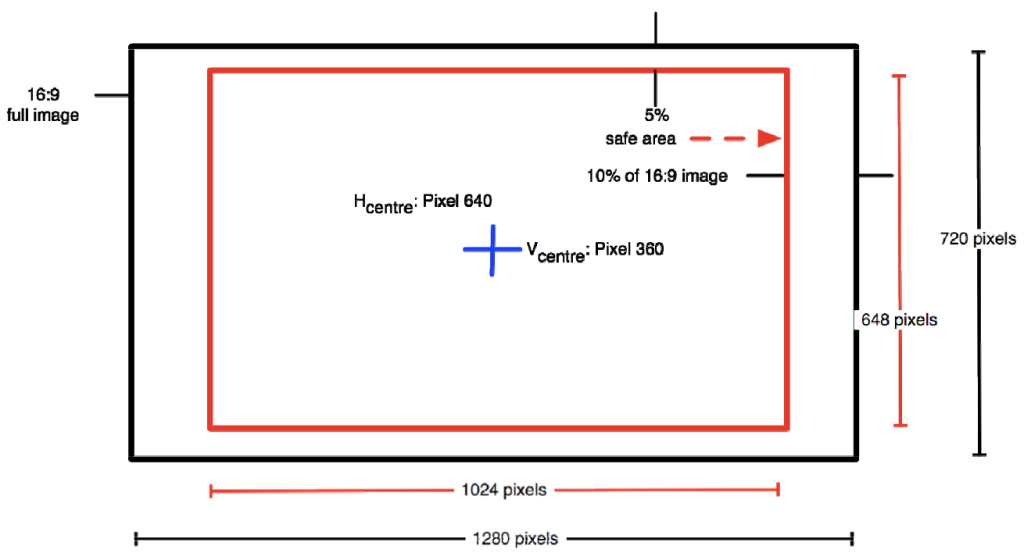
Graphic safe area as recommended by OIPF/HbbTV
The tutorials within this user guide, do use this safe area.
Interlaced and progressive
No discussion of resolution is complete without an explanation of interlaced and progressive. The terms “interlaced” and “progressive” refer to different methods of displaying video frames on a screen. They are commonly denoted by an “i” for interlaced and a “p” for progressive, often seen in video resolutions like 1080i and 1080p.
Interlaced video displays each frame in two passes. The first pass draws the odd-numbered lines (1, 3, 5, etc.), and the second pass draws the even-numbered lines (2, 4, 6, etc.), with these two sets of lines called fields, combining to form a complete frame. This method effectively doubles the perceived frame rate without increasing the bandwidth, such as 30 frames per second (fps) interlaced video displaying 60 fields per second. Historically, interlaced video was used in older television systems like NTSC and PAL to conserve bandwidth while still providing a smooth motion appearance. However, it can cause visual artifacts like flickering and line tearing, particularly noticeable in high-motion content, and is less compatible with modern digital displays, which are inherently progressive.
Progressive video, on the other hand, displays each frame in a single pass, drawing all lines in sequence from top to bottom, meaning each frame is a complete picture. This method is commonly used in modern digital displays such as LCDs, LEDs, computer monitors, and digital broadcasts, and it is standard for online streaming, Blu-ray, and most HD content. Progressive scanning delivers smoother motion and clearer images, especially for fast-moving scenes, making it preferable for high-definition and ultra-high-definition content. While it requires more bandwidth than interlaced video of the same resolution and frame rate, the superior image quality and stability make progressive scanning the favoured choice for contemporary video production and display.